
Platform · AI
Mira™ AI.
Seven AI features running today. BAA-gated, per-org opt-in, audit-logged. AI that watches over the details — not a chat-with-internet-LLM.
AI built around the work — not bolted on afterward.
Every AI feature in Mira™ reads from the same data your staff already enters: visit documentation, care plans, payer contracts, claim histories, and the patient's care record. There is no separate AI workspace, no data to re-enter, no model that hallucinates because it doesn't know your patient. The model knows your patient because it reads the chart.
The compliance architecture is built in, not added on top. A Business Associate Agreement is in place with every AI provider before any PHI-adjacent data is processed. Every organization starts with all AI features off. An admin enables each feature per organization when — and only when — the organization is ready. Every AI call is recorded: feature invoked, prompt length, latency, opt-in status at the time of the call. The prompt body and the model's response are never stored.
If the AI provider is unavailable, the workflow continues. The user sees a clear "AI unavailable" notice. The claim can still be submitted. The IDG meeting can still proceed. No silent degradation — the AI is an accelerator, not a dependency.
Seven features running today
- ✓ Audit-anomaly narratives — plain-language explanations of documentation gaps
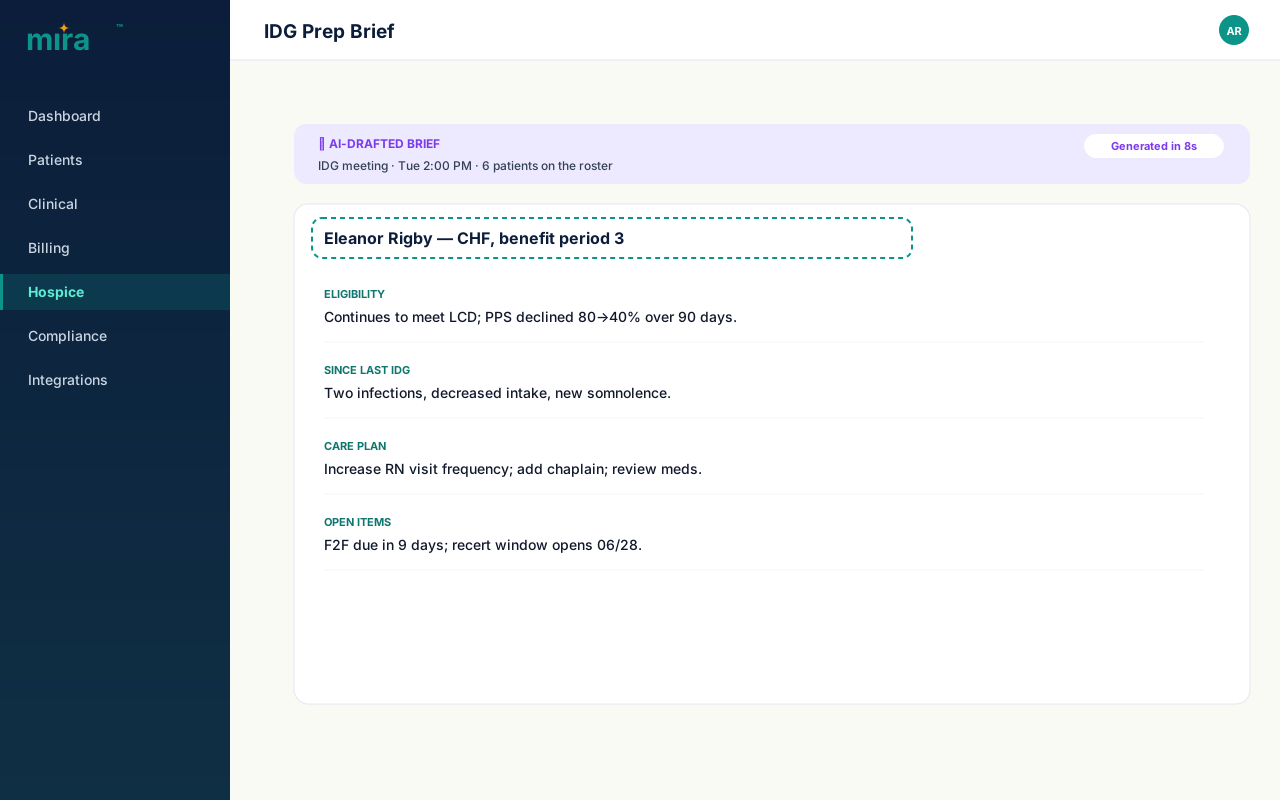
- ✓ IDG prep briefs — chart-sourced draft in 8 seconds
- ✓ Denial prediction — risk score before claim submission
- ✓ Denial appeal drafter — payer-specific letters from claim + clinical history
- ✓ Claim coding assistant — inline code suggestions flagged before submission
- ✓ Family-portal chatbot — bilingual EN+ES, grounded to the patient's care record
- ✓ Visit-note summarizer — clinician-facing chart abstract with cited sources
Compliance architecture
- → BAA in place with every AI provider before any data is processed
- → Per-org opt-in — all features off by default; admin enables per organization
- → Audit log: feature name, prompt length, latency, opt-in status — never prompt body or response
- → Fail-closed: provider unavailable → clear user notice, workflow continues unblocked
- → Per-hour, per-org rate limits — billing AI throttled first to protect clinical workflows
- → SOC2 Type II in progress; current controls documented and available under NDA
Audit narratives that explain what's missing. IDG briefs that take 8 seconds, not 4 hours.
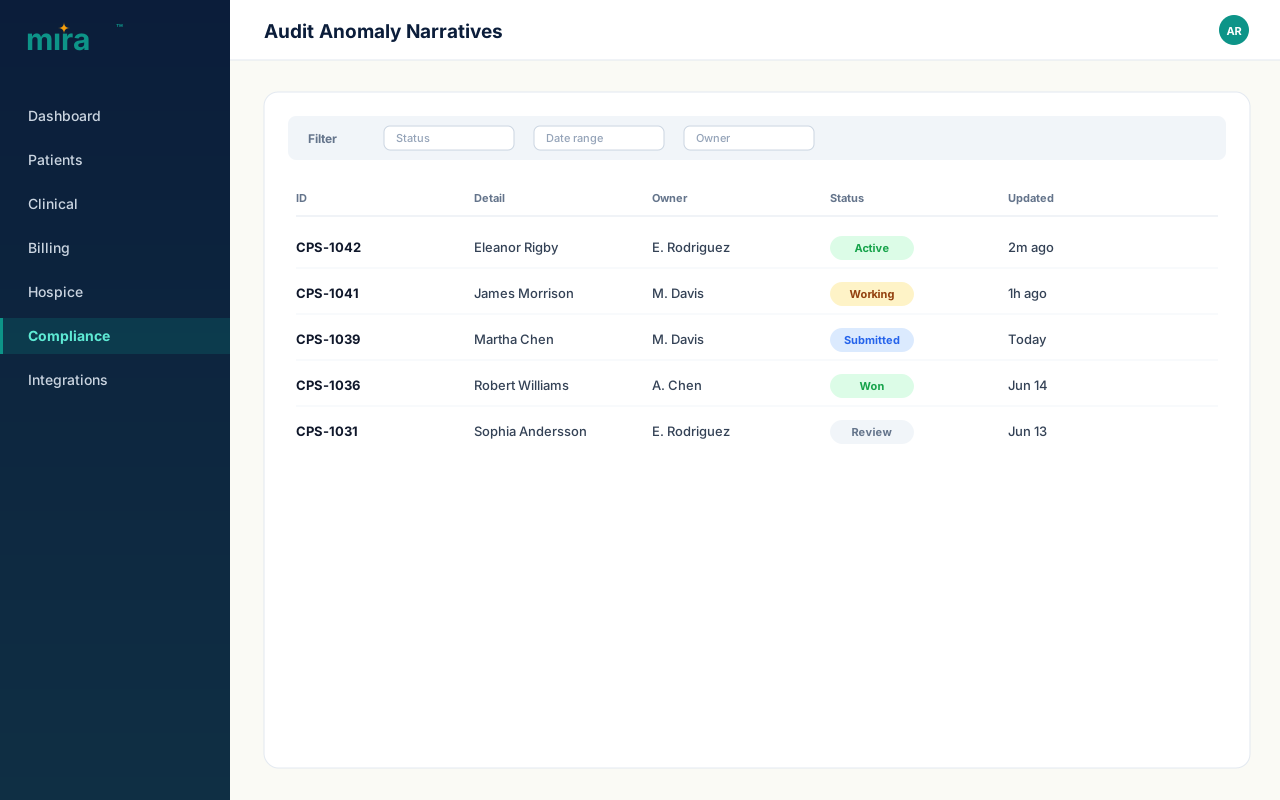
Audit-anomaly narratives read the documentation patterns across a patient's record and produce a plain-language explanation of each gap: which visit note is missing a required attestation, which care plan is outside its update window, which diagnosis code is inconsistent with the Level of Care billed. A surveyor sees the same data. The narrative tells your staff what to fix before the surveyor arrives.
IDG prep briefs do something different. Before a weekly interdisciplinary meeting, a clinician normally spends 45–90 minutes pulling together the relevant chart data for each patient on the agenda. The IDG prep brief does that in 8 seconds: it reads the care plan, the last several visit notes, any open medication orders, and the current diagnosis list, and produces a structured draft. The clinician edits. They never start from scratch.
Both features are accessed through the care record. Neither sends data outside the Mira™ platform unless the org's AI provider is configured. Both are logged: the audit system records that the feature ran, the patient and org IDs, and the prompt length. The content of the brief is not retained in the audit log.
- – Anomaly narratives explain root cause — not just "documentation gap" flags
- – IDG brief reads care plan, recent visit notes, active orders, and current diagnoses
- – Sources cited per claim in the brief — click any claim to see the source note
- – Both features opt-in per org; default off; audit-logged; fail-closed
 Mira product screenshot with numbered annotations. 1
 - 1 Plain-language explanations of documentation gaps.
 Mira product screenshot with numbered annotations. 1
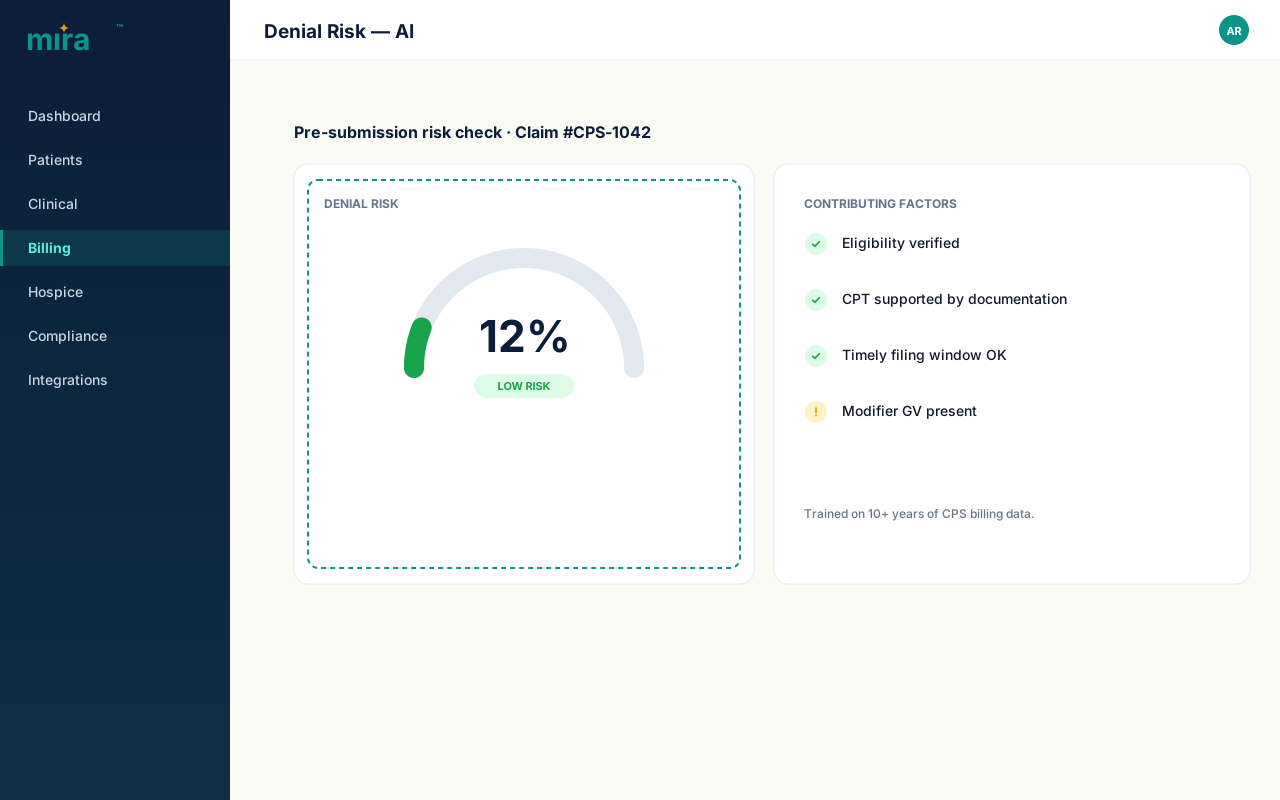
 - 1 Risk score appears before submission.
A risk score before you submit. A payer-specific letter when you appeal.
The denial prediction model runs when a biller builds a claim. Before the claim is submitted, the model scores it against a pattern of historical claim-denial data: payer, diagnosis codes, Level of Care billed, provider type, and the completeness of the attached visit documentation. A high-risk score doesn't block submission — it surfaces information so the biller can decide to fix the claim or submit knowing the risk.
The denial appeal drafter runs after a denial arrives. It reads the payer's denial reason code, the original claim, and the clinical documentation that supports the claim, and produces a draft appeal letter formatted to the payer's known preferences. Billers edit. The letter doesn't go out automatically. What the tool eliminates is the 20-30 minutes a biller would spend pulling together the facts and writing the opener.
Both features process only the data in the Mira™ record for that claim. No external search, no scraping, no model that "knows about" the payer from general internet training. The appeal quality comes from the clinical and billing data already in the system.
- – Risk score visible on the claim builder before the biller clicks submit
- – Appeal drafter reads the denial reason code + original claim + supporting clinical docs
- – Payer-specific formatting applied where payer preferences are on file
- – Both features opt-in per org; audit-logged; fail-closed — submission never blocked by AI failure
Coding suggestions that read the chart — before the claim goes out.
A coding error on a hospice claim is rarely a coder forgetting a code they know. It's a code that is technically correct but doesn't reflect the full acuity documented in the visit note — or a secondary diagnosis that was added two visits ago and never made it into the claim template. The claim coding assistant reads the visit documentation, care plan, and active diagnosis list and surfaces codes the biller may have missed.
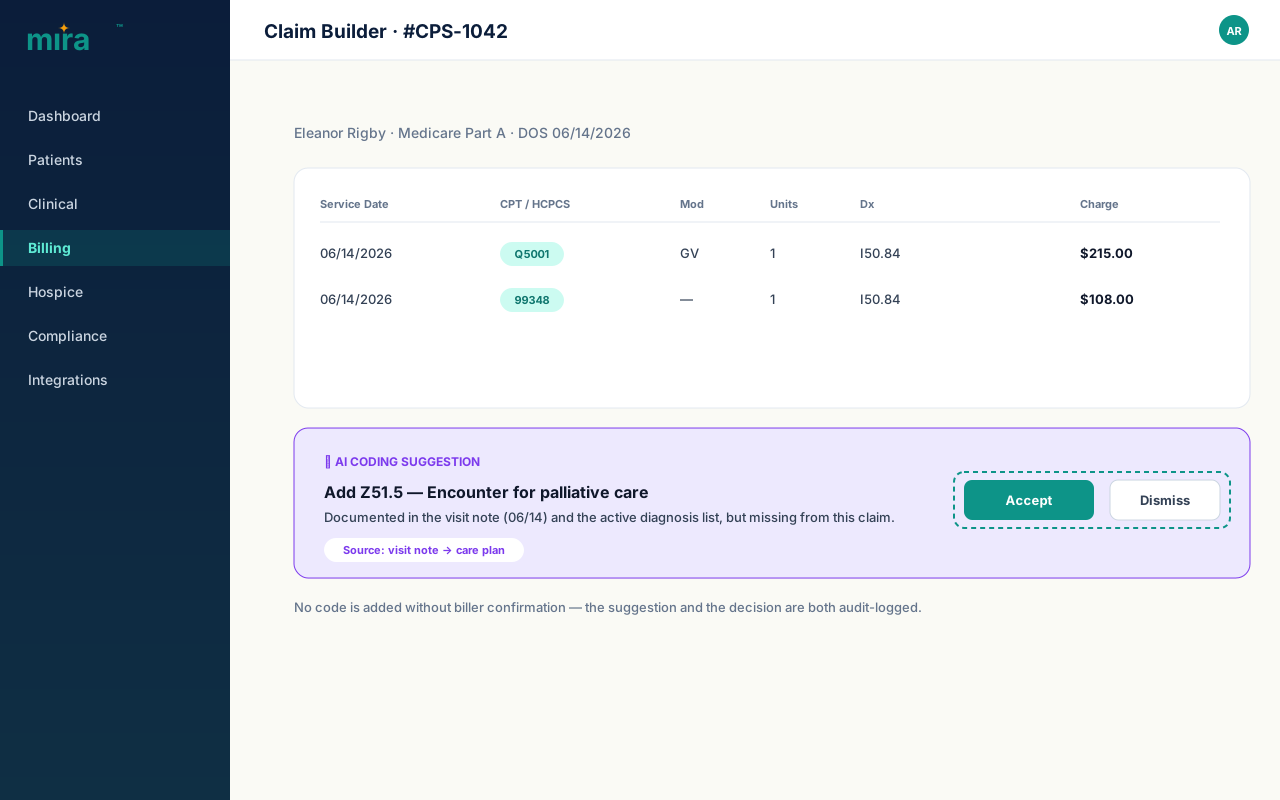
Suggestions appear inline in the claim builder — not in a separate window, not in a report that arrives after the claim is submitted. The biller reviews each suggestion, accepts or dismisses, and the accepted codes are added to the claim. No code is added without human confirmation. The suggestion and the biller's decision are both logged.
- – Reads visit documentation, care plan, and active diagnosis list
- – Suggestions appear inline before submission — not in an after-the-fact report
- – Each suggestion requires explicit biller confirmation before the code is added
- – Both the suggestion and the acceptance/dismissal are audit-logged
 Mira product screenshot with numbered annotations. 1 2
 - 1 Suggested codes surfaced inline from the visit note — before submission.
- 2 Accept or dismiss — no code is added without biller confirmation.
 Mira product screenshot with numbered annotations. 1
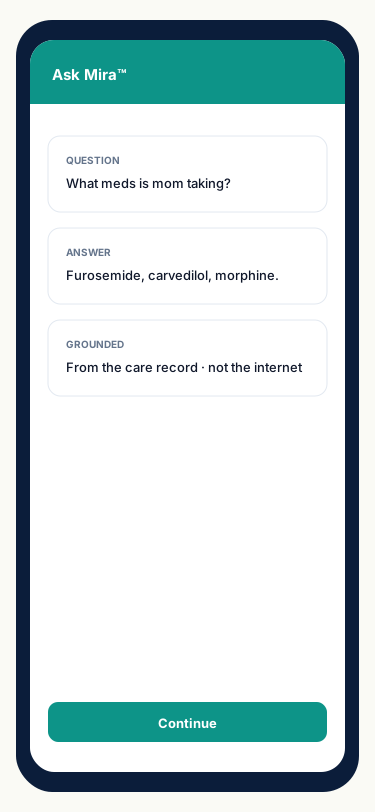
 - 1 Bilingual EN+ES. Grounded to the patient's care record.
A chat window that knows the patient. Not a general-purpose assistant that doesn't.
Family members in a hospice context have questions that a general-purpose AI chatbot cannot answer well: What did the nurse say on Tuesday's visit? What medications is my mother currently on? When is the next visit scheduled? Answering those questions from general AI training is impossible — the model doesn't know your patient.
The family-portal chatbot is grounded to the patient's care record. The model reads the current care plan, visit summary history, active medication list, and scheduled visit calendar. It can answer specific questions about this patient's care because it has access to this patient's record. It cannot be asked about other patients — the query scope is enforced server-side per authenticated family member.
The chatbot is bilingual: family members can ask questions in English or Spanish and receive answers in the same language. The UI detects language preference automatically and can be switched mid-conversation.
- – Grounded to the patient's care record — care plan, visit notes, medication list, schedule
- – Query scope enforced server-side: each family member sees only their patient's data
- – Bilingual EN+ES — language auto-detected from the question, switchable mid-conversation
- – Thumbs up/down feedback captured per response; aggregate ratios visible to admin
The entire chart, summarized. Sources cited. Ready in seconds.
A clinician seeing a patient for the first time — a covering nurse, a new physician, a consultant joining the IDG — needs to understand the full care history quickly. Reading every visit note in the chart takes 20-30 minutes. The visit-note summarizer reads the whole chart and produces a structured clinical abstract: presenting history, care trajectory, active problems, current medications, recent notable events, and open clinical questions.
Every claim in the summary is cited to the specific note it came from. The clinician can click any statement and see the source note, the date it was written, and the clinician who wrote it. This is not decorative — it allows the reviewing clinician to verify anything the model surfaced before acting on it. The summary is a starting point, not a finished document.
- – Reads the full visit-note history — not just the most recent note
- – Structured abstract: presenting history, trajectory, active problems, medications, open questions
- – Every claim cited to source note, date, and author — click to view the original
- – Access controlled by the clinical:visit_notes policy; audit-logged per use
 Mira product screenshot with numbered annotations. 1 2
 - 1 8-second draft from the chart.
- 2 Sources cited per claim — auditable.
Walk through all eight AI features in 90 seconds.
Opt-in → rate limits → denial prediction → IDG brief → appeal drafter → fail-closed → audit log → BAA. Eight steps.
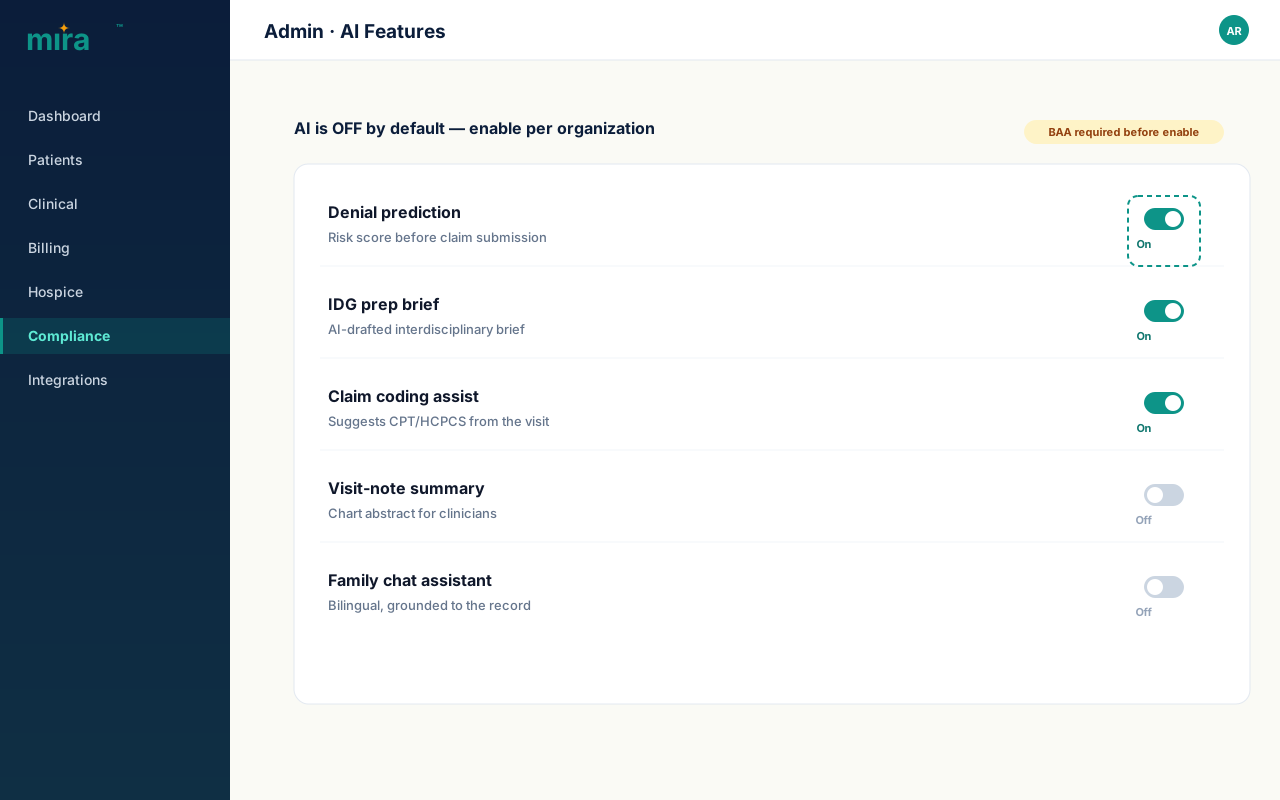
Per-org opt-in
Default off. Admin toggles AI features per organization.
How AI fits the bigger picture.
Mira™ Clinical
Audit-anomaly narratives, IDG prep briefs, and the visit-note summarizer all read from the clinical record. The better the documentation, the more useful the AI output — which is another reason good charting discipline pays off downstream.
Explore Clinical →Mira™ Billing
Denial prediction and appeal drafting live inside the billing workflow. The risk score appears on the claim builder; the appeal drafter opens from the denial record. No separate AI tool to switch to — it's part of the biller's normal flow.
Explore Billing →See it live
Book a 30-minute demo and we'll walk through the AI features that are most relevant to your team — clinical staff, billers, or family engagement. Bring a real denial or a real IDG scenario and we'll show you what the output looks like.
Book a demo →Ready to see Mira™ AI working on your actual patient data?
We'll demo the features most relevant to your team — with your denial patterns, your IDG workflow, or your family engagement model. 30 minutes, no slides.